Discover, Compare & Master Find the best AI tools for your next project in seconds. Check our latest AI insights

Render A House

Verified Trending

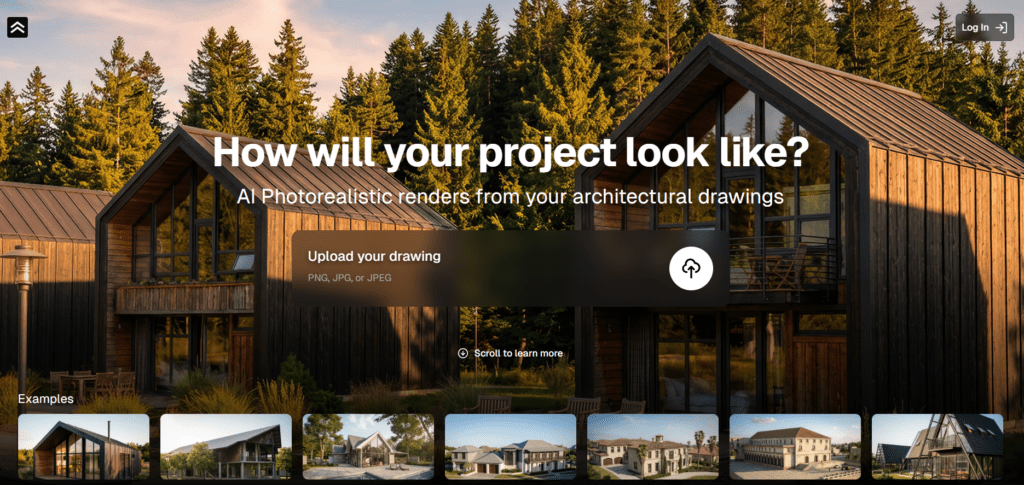
Render A House is an AI-powered 3D rendering platform that turns floor plans and photos into photorealistic architectural visuals and immersive walkthroughs.

4.5/5 editorial rating 876 upvotes
  • Main category: 3D
  • Subcategory: AI 3D Model Generator
  • Pricing: $39/month
  • Web
  • Best For Architects, interior designers, real estate professionals, home builders, and 3D artists needing fast, high-quality home visualisations.
  • Free Trial Yes
  • Reviewed By arbaazkhan
  • Last Updated March 27, 2026

Editorial note: ratings and verdicts on this page are internal editorial assessments, not third-party user review averages.

Render a House - Render in 10 seconds

Render A House Verdict

The Daily AI Tools team found that Render A House delivers a powerful solution for turning architectural plans, sketches, and photos into photorealistic 3D renders and immersive visualisations. Its AI-driven system simplifies what traditionally required expensive rendering software and technical expertise. Render A House offers clear, efficient, and visually striking results.

What Is Render A House?

Render A House AI is an artificial intelligence-powered architectural visualisation tool. It transforms house plans, sketches, and reference images into detailed 3D renders and immersive virtual environments. Instead of relying on manual 3D modelling and complex rendering software, users can feed the platform designs in various formats.

Moreover, you can convert 2D floor plans to photos. The AI interprets spatial layouts, materials, lighting, and perspective to produce photorealistic results. RenderAhouse AI uses natural language processing (NLP) and generative visual models to understand descriptions.

The approach allows users without technical 3D skills to generate accurate visualisations for design evaluation, client presentations, real estate marketing, or renovation previews. Render A House AI also supports walkthroughs and customizable angles, enabling interactive exploration of spaces and helping stakeholders better visualise finished environments before construction or staging.


Review Summary

  • Performance Score A
  • Content Quality High
  • Interface User-Friendly
  • Ai Technology NLP interpretation, generative rendering, spatial understanding
  • Purpose Architects, designers, real estate pros
  • Compatibility Web platform with export options
  • Pricing Summary Subscription based

Render A House Key Features

  • 1

    AI Architectural Rendering

  • 2

    Natural Language Input

  • 3

    Floor Plan Interpretation

  • 4

    Material & Lighting Realism

  • 5

    Walkthrough & Camera Views

  • 6

    High-Resolution Export

  • 7

    Custom Scene Adjustments

  • 8

    Quick Turnaround

  • 9

    Web-Based Workflow

  • 10

    Collaborative Presentation

Who Should Use Render A House?

Render A House is an AI-powered 3D rendering platform that turns floor plans and photos into photorealistic architectural visuals and immersive walkthroughs.

Is Render A House Worth It?

Render A House is a paid product, so value depends on whether its features, performance, and workflow justify the cost.

Pros And Cons

Pros

  • High-quality visual outputs with depth and detail
  • Quickly generates scenes from simple inputs
  • No 3D modelling skills required
  • Describe designs with text and see accurate results
  • Explore spaces from inside for better visualisation

Cons

  • Heavy render workflows consume higher credits
  • May require desktop tools for fine detail adjustment
  • Some export optionsare only available in higher plans
  • Results reflect the clarity of the uploaded plan or description

Render A House Pricing

Pro

$39/Month

  • 500 Renders per month
  • 90 video seconds per month
  • Support

Studio

(Custom)

  • Guest & Team Collaboration
  • Direct Support( WhatsApp, Email, Phone)
  • Expert Onboarding Services
  • 3D and Live Rendering
  • Early Access to new features
  • Real World project insertion

Frequently Asked Questions