Discover, Compare & Master Find the best AI tools for your next project in seconds. Check our latest AI insights

Adobe Firefly AI

Verified Featured

Adobe Firefly’s AI tools integrate prompt-based motion design into Creative Cloud, streamlining the creation of short clips and visual effects.

4.1/5 editorial rating 754 upvotes
  • Main category: Image
  • Subcategory: AI Image Generation
  • Pricing: $9.99/Month
  • Web
  • Best For Motion designers, video editors, social content creators, and Adobe ecosystem users seeking AI-assisted motion concepts
  • Free Trial Yes
  • Reviewed By arbaazkhan
  • Last Updated March 2, 2026

Editorial note: ratings and verdicts on this page are internal editorial assessments, not third-party user review averages.

Adobe Firefly AI Verdict

The Daily AI Tools experts found that Adobe Firefly is a strong AI creative assistant that brings generative motion and visual tools directly into the Adobe Creative Cloud environment. Its deep integration with Premiere Pro and After Effects accelerates motion concept creation, making it ideal for professionals embedded in those workflows. For creatives invested in Adobe’s ecosystem, Firefly offers a practical enhancement that balances productivity and creative control.

What Is Adobe Firefly AI?

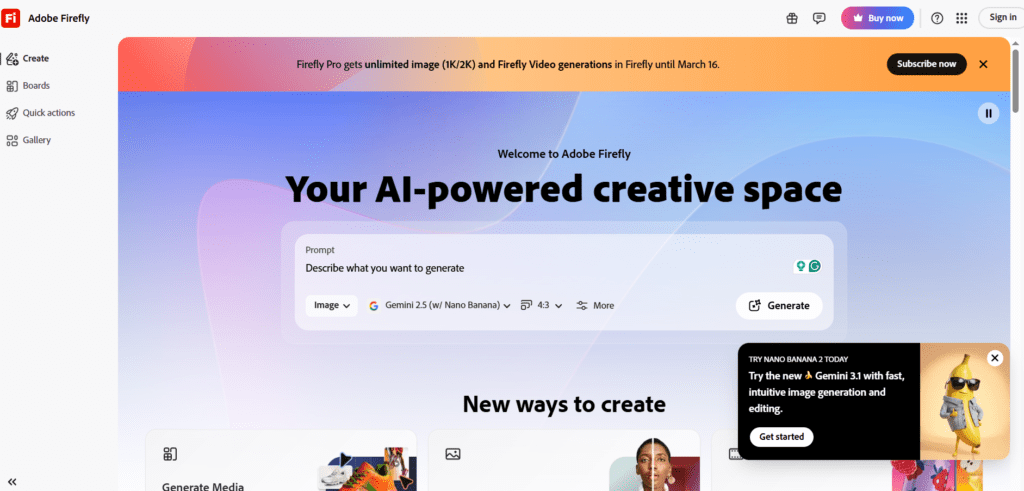
Adobe Firefly is an AI-enhanced creative suite that brings generative motion and visual content creation into Adobe’s broader Creative Cloud ecosystem. It uses NLP to interpret prompts like “animate this title with smooth kinetic energy” or “add cinematic motion to this still image,” and converts them into animated or motion visuals that can be refined in Premiere Pro, After Effects, or Photoshop.

Rather than functioning as a standalone AI video generator, Firefly’s strength is its deep integration with traditional editing software. Ideal for professionals needing AI-assisted motion elements that are instantly editable and compatible with existing workflows.

Moreover, Firefly’s AI features include text-guided motion generation, image motion effects, prebuilt animated templates, and style presets that help creators bridge the gap between concept and final output without leaving their primary workspace.


Review Summary

  • Performance Score A
  • Content Quality High
  • Interface User-Friendly
  • Ai Technology NLP video/motion prompting and generative effects
  • Purpose Motion designers, video editors, social content creators
  • Compatibility Browser + Adobe Creative Cloud apps
  • Pricing Summary Subscription plans

Adobe Firefly AI Key Features

  • 1

    AI Text-to-Motion Video Prompts

  • 2

    AI Image Motion Effects

  • 3

    Prebuilt Motion Templates

  • 4

    Creative Cloud Integration

  • 5

    Prompt-Guided Animation

  • 6

    Cinematic Visual Presets

  • 7

    Style Controls

  • 8

    Export Options

  • 9

    Refinement Tools

  • 10

    Iteration Support

Who Should Use Adobe Firefly AI?

Adobe Firefly’s AI tools integrate prompt-based motion design into Creative Cloud, streamlining the creation of short clips and visual effects.

Is Adobe Firefly AI Worth It?

Adobe Firefly AI is a paid product, so value depends on whether its features, performance, and workflow justify the cost.

Pros And Cons

Pros

  • Seamless integration with Creative Cloud apps
  • Natural language simplifies motion design
  • Jumpstarts creative phases
  • Combines AI with traditional editing
  • Helpful for common motion tasks and output formats

Cons

  • Limited standalone video capability compared to specialized tools
  • Less cinematic refinement than dedicated AI video generators
  • Creative Cloud pricing can feel expensive
  • Motion tools are expanding but not fully mature

Adobe Firefly AI Pricing

Standard

$9.99/Month

  • 2000 Credits /Month
  • Generate up to 20, 5-second videos
  • Translate up to 6 minutes of audio
  • Generate with industry-leading partner AI models

Pro

$19.99/Month

  • 4000 Credits/Month
  • Generate up to 40 5-second videos
  • Translate up to 13 minutes of audio
  • Generate with industry-leading partner AI models

Frequently Asked Questions