Discover, Compare & Master Find the best AI tools for your next project in seconds. Check our latest AI insights

Ideogram

Verified

Ideogram AI review covering features, pricing, and AI image generation tools. Create logos, posters, and visuals with accurate text rendering using Ideogram.

4.7/5 editorial rating 837 upvotes
  • Main category: Image
  • Subcategory: AI Image Generation
  • Pricing: Freemium
  • Web
  • Best For AI image generation, logo creation, typography graphics, marketing visuals, and poster design
  • Free Trial Yes
  • Reviewed By arbaazkhan
  • Last Updated March 13, 2026

Editorial note: ratings and verdicts on this page are internal editorial assessments, not third-party user review averages.

Ideogram Verdict

The Daily AI Tools experts found that Ideogram AI is a powerful image generator that delivers accurate text and typography. Its advanced text-to-image model creates creative images that many tools struggle with, especially when prompts include written text. Features like Magic Prompt, style customization, and AI canvas editing make visual creation faster and more accessible. Ideogram delivers impressive results with AI-generated graphics and readable text.

What Is Ideogram?

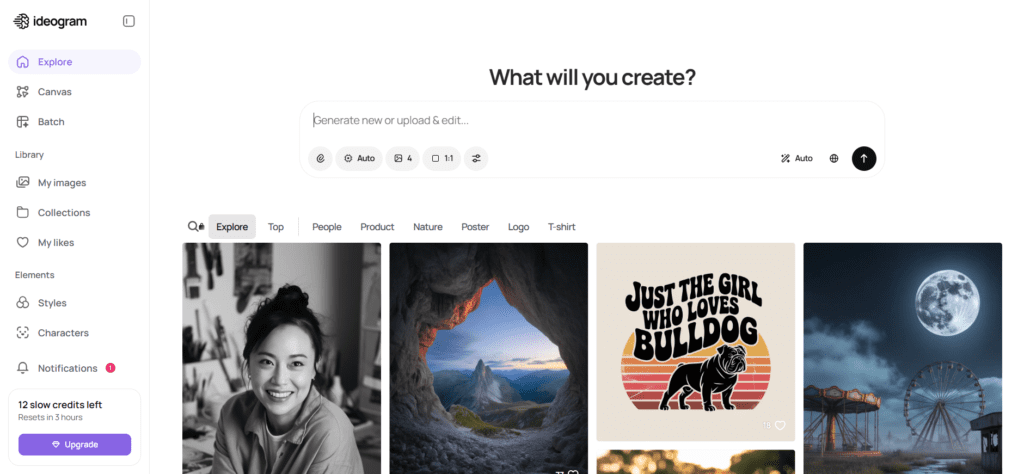
Ideogram AI is an advanced AI image generator that transforms written prompts into high-quality visuals using generative artificial intelligence. The platform allows users to create digital artwork, marketing graphics, posters, and branding images simply by describing their ideas in natural language. Its text-to-image model interprets prompts and generates multiple visual variations in seconds.

One of the defining strengths of Ideogram AI is its ability to generate images with clear, readable text elements, which many AI image generators struggle to achieve. This capability makes it particularly useful for logo design, typography graphics, social media visuals, posters, and marketing banners. Designers and creators often rely on Ideogram to produce branded visuals where text accuracy matters.

The platform also includes advanced features such as Magic Prompt, a prompt-enhancement technology, style customisation, and AI canvas editing tools that help refine generated images. Users can adjust image styles, remix existing visuals, and experiment with different creative approaches to achieve the desired results. Because the tool is cloud-based and easy to use, Ideogram works well for both beginners and professional creators.


Review Summary

  • Performance Score A+
  • Content Quality Very High
  • Interface User-Friendly
  • Ai Technology Diffusion-based generative image models, Large language model prompt interpretation, Natural Language Processing for prompt understanding, Deep learning typography rendering technology, Computer vision, Machine Learning
  • Purpose AI image generation from text prompts. Logo and typography design, Poster and marketing graphic creation, Social media visual content, AI branding concept generation, Digital artwork and illustrations, Creative design experimentation
  • Compatibility Windows, Mac, Android, Linux
  • Pricing Summary Free access + Subscription Model

Ideogram Key Features

  • 1

    AI Text-to-Image Generation

  • 2

    Accurate Text Rendering

  • 3

    Magic Prompt Optimization

  • 4

    AI Canvas Editor

  • 5

    Multiple Image Variation

  • 6

    Style Customization

  • 7

    Aspect Ratio Controls

  • 8

    Community Inspiration Feed

  • 9

    High-Resolution Image Generation

  • 10

    Fast AI Rendering

Who Should Use Ideogram?

Ideogram AI review covering features, pricing, and AI image generation tools. Create logos, posters, and visuals with accurate text rendering using Ideogram.

Is Ideogram Worth It?

Ideogram offers a free starting point, while paid plans may make sense for heavier or team-based use.

Pros And Cons

Pros

  • Excellent AI image generator with readable text rendering
  • Ideal for logos, posters, and typography graphics
  • Easy prompt-based interface for beginners
  • Generates multiple image variations quickly
  • Magic Prompt improves prompt quality automatically
  • Strong creative community for inspiration

Cons

  • Free plan includes limited image generation credits
  • Some advanced features require paid plans
  • Image editing tools are simpler than professional design software
  • Requires internet access since the platform is cloud-based

Ideogram Pricing

Free

$0

  • Limited public generation
  • Limited access to Canvas

Plus

$20/Month

  • Private generation
  • 1,000 priority credits/month
  • Unlimited slow credits
  • Unlimited character consistency
  • Quality export
  • Larger generation queue
  • Top up 150 priority credits for $4

Pro

$60/Month

  • Everything in the Plus Plan
  • The best cost per credit
  • 3,500 priority credits/month
  • Batch Generation
  • The largest generation queue
  • Top up 250 priority credits for $4

Team

$30/User/Month

  • 1,500 priority credits per user/month
  • Central billing and administration
  • Early access to collaboration features
  • Top up priority credits for $4

Frequently Asked Questions